
How to Optimise Your Website for AI Search in 2026

How to Optimise Your Website for AI Search in 2026 Search Has Changed—Is Your Website Ready? For years, businesses focused almost entirely on ranking on Google. While search engine optimisation (SEO) remains important, today’s customers increasingly receive answers without clicking a website. People now ask ChatGPT, Google AI Overviews, Microsoft Copilot, Perplexity AI and voice assistants questions such as: Who is the best digital marketing agency near me? How much does SEO cost? Which website platform is best for small businesses? What is Answer Engine Optimisation? Instead of showing only blue links, AI platforms generate direct answers by analysing trusted websites. If your business isn’t providing the right signals, your competitors could be recommended instead. This is why AI Search Optimisation has become one of the most important digital marketing strategies for businesses in 2026. What Is AI Search Optimisation? AI Search Optimisation is the process of structuring your website so artificial intelligence platforms can understand, trust and reference your content. Unlike traditional SEO, the goal isn’t only ranking on Google. It is also about becoming a trusted source that AI systems use when generating answers. This combines: Keyword optimization Answer Engine Optimisation (AEO) Generative Engine Optimisation (GEO) Structured data Entity optimisation Helpful, authoritative content AI Search Optimisation is the process of structuring your website so artificial intelligence platforms can understand, trust and reference your content. Unlike traditional SEO, the goal isn’t only ranking on Google. It is also about becoming a trusted source that AI systems use when generating answers. This combines: Why Traditional SEO Alone Is No Longer Enough Traditional SEO focuses on: Keywords Backlinks Meta titles Rankings Modern search also considers: Content accuracy Brand authority Entity relationships Structured information Topical expertise User intent Businesses that adapt are more likely to appear in AI-generated responses as well as traditional search results. 1. Build Content Around Questions AI tools are designed to answer questions. Instead of writing only service pages, create content that answers real customer queries. Examples include: How much does website design cost? What is local SEO? How long does SEO take? What makes a good landing page? Each article should answer one topic thoroughly. 2. Demonstrate Real Expertise AI systems favour trustworthy information. Include: Real business experience Original insights Practical examples Industry knowledge Case studies Avoid publishing generic content created solely to rank for keywords. 3. Structure Content Clearly Well-structured pages help both users and AI understand your information.Use: One H1 heading Logical H2 and H3 headings Short paragraphs Bullet lists Comparison tables where appropriate Frequently Asked Questions Good structure improves readability and helps AI identify key information. 4. Optimise for Entities, Not Just Keywords Search engines increasingly understand topics through entities rather than individual keywords. For example, a page about digital marketing may naturally connect with: SEO Google Business Profile Website development Content marketing Google Ads Local SEO Cover related concepts naturally instead of repeating the same keyword excessively. 5. Add Structured Data Schema markup helps search engines understand your content. Useful schema types include: Article FAQ Organisation Service Local Business Breadcrumb Author Structured data improves your chances of appearing in rich search features and AI-generated responses 6. Strengthen Internal Linking Every important page should connect naturally to related content. For example: A blog about AI Search can link to: SEO services Website development Digital marketing Content marketing Business consultancy Internal links help search engines understand your website’s expertise across related topics. 7. Improve User Experience AI search rewards websites that provide a strong user experience. Focus on: Fast loading speeds Mobile responsiveness Clear navigation Content marketing Accessible design Helpful content Good user experience also improves conversion rates. 8. Build Brand Authority Across the Web AI systems don’t rely on your website alone.They also consider your broader online presence. Maintain consistent business information across: Google Business Profile LinkedIn Industry directories Business listings Social media Consistency builds trust and reinforces your brand identity. Common Mistakes Businesses Still Make Many websites continue to rely on outdated SEO tactics. Common mistakes include: Keyword stuffing Thin content Duplicate pages Poor internal linking Missing schema markup Ignoring AI search trends Publishing content without demonstrating expertise Avoiding these issues improves both search visibility and user experience. The Future of Search Is Already Here AI search isn’t replacing traditional search—it is expanding it. Businesses that optimise only for rankings risk losing visibility as users increasingly rely on AI-generated answers. By combining strong SEO fundamentals with AI-focused optimisation, you can improve your chances of being discovered wherever your customers search. Whether someone searches on Google, asks ChatGPT a question or uses another AI-powered platform, your website should be ready to provide the answer. Frequently Asked Questions What is AI Search Optimisation? AI Search Optimisation helps websites become more visible in AI-powered search platforms such as Google AI Overviews, ChatGPT and Perplexity. Is AI Search replacing SEO? No. AI Search builds on traditional SEO. The most effective strategy combines SEO, Answer Engine Optimisation (AEO) and Generative Engine Optimisation (GEO). Does schema markup help AI search? Yes. Structured data helps search engines better understand your content, which can improve visibility in rich search results and AI-generated responses. How can businesses prepare for AI search? Businesses should create helpful content, improve website structure, add structured data, strengthen internal linking and demonstrate genuine expertise. Why is AI Search important for businesses? More people are using AI-powered tools to research products, services and businesses. Optimising for AI search increases your chances of being discovered during these searches.
WordPress vs Shopify vs Wix in 2026: Which Website Platform Is Best for Your Business?
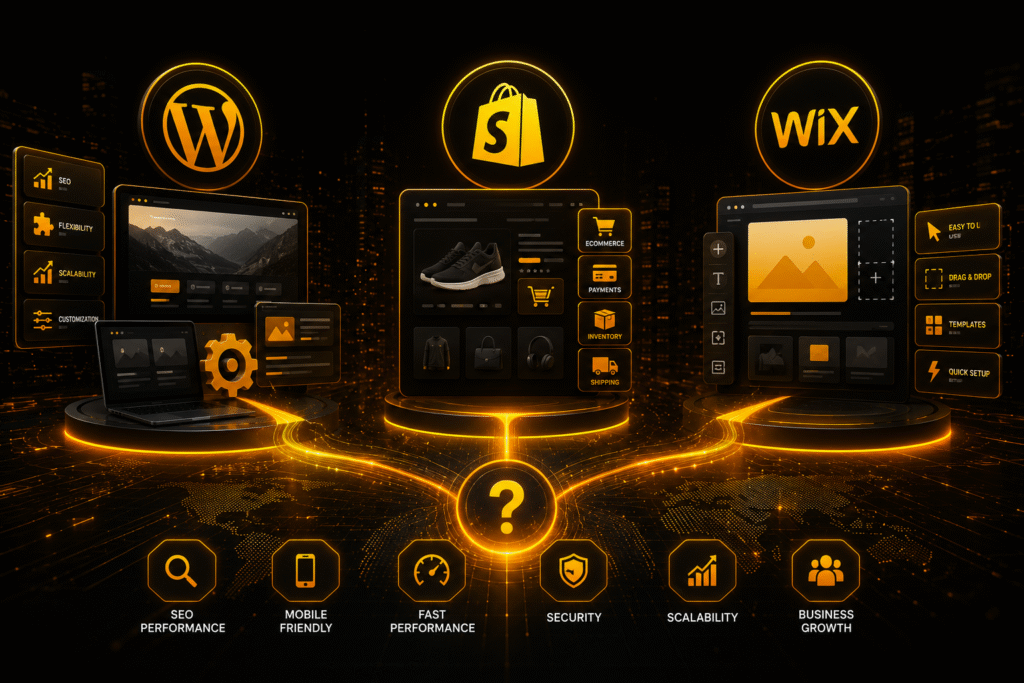
WordPress vs Shopify vs Wix in 2026: Which Website Platform Is Best for Your Business? Choosing the right website platform is one of the most important decisions for any business. 1. Your website affects: SEO performance User experience Scalability Online sales Lead generation Long-term growth Many businesses choose a platform based solely on convenience, but the wrong choice can lead to SEO limitations, poor scalability, and costly rebuilds later on. In 2026, businesses need websites that perform well across: Google search results AI-powered search platforms Mobile devices Ecommerce systems The three most popular platforms businesses compare are: WordPress Shopify Wix Each platform has different strengths depending on your business goals. 2. Quick Comparison: WordPress vs Shopify vs Wix Platform Best For SEO Ecommerce Scalability Ease of Use WordPress Business and content websites Excellent Strong Excellent Moderate Shopify Online stores Very Good Excellent Excellent Easy Wix Small and simple websites Basic–Good Basic Limited Very Easy 3. WordPress: Best for SEO and Long-Term Growth WordPress is one of the most flexible website platforms available. It is widely used because it offers: Strong SEO capabilities Advanced customization Scalability Thousands of integrations and plugins WordPress is ideal for businesses focused on: SEO Content marketing. Long-term growth Custom functionality Why Businesses Choose WordPress Strong SEO Performance WordPress provides advanced SEO control for: Meta titles and descriptions URL structures Schema markup Internal linking Technical SEO This makes WordPress one of the best platforms for improving organic rankings and AI visibility. Highly Scalable Businesses can expand WordPress websites into: Ecommerce stores Booking systems Membership platforms Custom business websites Unlike simpler website builders, WordPress grows with your business. Best For Service businesses SEO-focused companies Blogs and publishers Businesses planning long-term growth 4. Shopify: Best for Ecommerce Websites Shopify is a dedicated ecommerce platform built specifically for online selling. It simplifies: Product management Payments Inventory tracking Order management Shopify is popular because it enables businesses to launch online stores quickly without requiring advanced technical knowledge. Why Businesses Choose Shopify Built for Online Selling Shopify includes: Ecommerce tools Payment integrations Shipping systems Product management features For ecommerce-focused businesses, Shopify offers a streamlined experience. Easy to Manage Compared with WordPress, Shopify is easier for beginners to manage and maintain. Shopify SEO Shopify has strong SEO functionality, particularly for ecommerce websites, but it offers less flexibility than WordPress for advanced SEO strategies and content-focused websites. Best for Ecommerce stores Product-based businesses Fashion and retail brands Online sellers 6. Key Differences That Matter SEO Performance For SEO and AI visibility: WordPress Shopify Wix WordPress provides the greatest SEO flexibility and long-term optimization potential. Ecommerce Capability For ecommerce: Shopify WordPress(WooCommerce) Wix Shopify is specifically designed for selling products online. Ease of Use For beginners: Wix Shopify WordPress Wix is the easiest to use, while WordPress requires more setup and ongoing management. Scalability For long-term business growth: WordPress Shopify Wix WordPress and Shopify scale far better than Wix for growing businesses. 7. Common Mistakes Businesses Make Choosing Based Only on Simplicity Many businesses choose platforms because they are easy to use, only to later encounter: SEO limitations Restricted functionality Scalability issues Expensive migrations Your website platform should support long-term growth, not just short-term convenience. Ignoring SEO and AI Visibility Modern websites need optimization for: Search engines AI-generated search Mobile performance User experience The platform you choose directly affects your visibility and rankings. 8. Which Website Platform Is Best? Choose:. WordPress for SEO, flexibility, and long-term scalability. Shopify for ecommerce and online selling. Wix for simple and beginner-friendly websites. There is no one-size-fits-all solution. The best website platform depends on: Your business goals SEO strategy Ecommerce requirements Growth plans Website functionality requirements Final Thoughts Choosing the right website platform is about more than design. Your platform affects: SEO performance AI visibility User experience Business growth Lead generation Businesses focused on long-term growth should choose a platform that supports scalability, flexibility, and strong search performance. A well-built website becomes more than an online presence — it becomes a valuable business asset that drives traffic, builds trust, and generates customers. Frequently Asked Questions Is WordPress Better Than Shopify? WordPress is better for SEO, content marketing, and flexibility, while Shopify is better for dedicated ecommerce functionality and simpler online store management. Is Wix Good for SEO in 2026? Wix SEO has improved, but it still has limitations compared with WordPress when it comes to advanced SEO strategies and scalability. Which Platform Is Best for Small Businesses? 1. WordPress for long-term growth 2.Shopify for ecommerce businesses 3.Wix for basic starter websites Which Website Platform Is Best for SEO? WordPress is generally considered the best platform for SEO because it offers greater flexibility and advanced optimization capabilities.
Why WordPress is the Best Choice for Dubai Businesses in 2026
Why WordPress is the Choice for Dubai Businesses in 2026 For Dubai businesses in 2026, having a website that is flexible, fast, and SEO-friendly is more important than ever. With technology evolving and AI-powered search engines like ChatGPT, Gemini, and Perplexity influencing how users find information, the platform you choose can make a huge difference. WordPress continues to be the top choice for businesses in Dubai, offering unmatched versatility and performance. Here’s why WordPress is the best platform for your business. Benefit: WordPress websites are more likely to rank well in both traditional Google search and AI-driven platforms. Clean and optimized code that search engines can easily read. Plugins like Yoast SEO and Rank Math for on-page optimization. Easy integration with Google Analytics and AI search tools. WordPress is designed with SEO in mind, helping your website rank higher in search results. Key features for SEO: How WordPress Boosts SEO Performance Outcome: You can create a professional, unique website that stands out in Dubai’s competitive market. Thousands of themes and templates for any industry. Drag-and-drop page builders for easy layout design. Custom plugins for added functionality without coding. Dubai businesses need websites that reflect their brand and meet customer needs. WordPress offers: Why WordPress is Easy to Customize Result: Faster, mobile-friendly websites improve user experience and search rankings. Responsive themes that adapt to all screen sizes. Optimization plugins for faster loading times. Compatibility with mobile-first design practices. With mobile traffic dominating in 2026, site speed and responsiveness are critical. WordPress advantages: WordPress Supports Mobile Friendly and Fast Websites Benefit: WordPress helps Dubai businesses leverage AI and digital marketing without technical barriers. Chatbots and AI-powered search tools can be embedded easily. Marketing automation plugins for email, social media, and CRM. Analytics tools for real-time insights and AI-driven content optimization. AI and automation are transforming how businesses engage with customers. WordPress makes integration simple: How WordPress Integrates with AI and Marketing Tools Outcome: Your website can grow safely with your business needs in Dubai. Regular updates keep WordPress core and plugins secure. Wide selection of security plugins to protect against cyber threats. Ability to scale from small business websites to large e-commerce stores. Security and scalability are crucial for businesses handling customer data or planning to grow. Key points: Why WordPress is Secure and Scalable Frequently Questions Why is WordPress popular for Dubai businesses WordPress is flexible, SEO-friendly, and easy to customize, making it ideal for businesses of all sizes Can WordPress help improve search engine rankings Yes. With SEO-friendly themes and plugins, WordPress websites are more likely to perform well in search results and AI-driven search. Is WordPress suitable for mobile devices Yes. WordPress themes are responsive and optimized for fast loading on all devices. Can WordPress integrate with AI tools Absolutely. WordPress supports chatbots, AI content tools, and marketing automation plugins. How secure is WordPress in 2026 With regular updates and security plugins, WordPress is highly secure and scalable for growing businesses. Get Professional WordPress Support in Dubai For Dubai businesses looking to build a website that stands out, VICORPORATE offers trusted WordPress web design services. From custom designs to SEO-optimized development, we help companies create websites that attract customers, drive engagement, and grow online.
How to Speed Up Your WordPress Website: Full Guide 2026

How to Speed Up Your WordPress Website: Full Guide 2026 Website speed plays a crucial role in SEO, user experience, and conversions. Studies show that if a website takes more than 3 seconds to load, over 50% of visitors leave the page. If your WordPress website is slow, you may experience: Lower Google rankings High bounce rates Reduced conversions Poor user experience In this guide, you’ll learn how to speed up your WordPress website step by step. Why Website Speed Matters Website speed impacts: SEO Rankings Google uses page speed as a ranking factor. Fast websites rank higher in search results. User Experience Visitors expect websites to load instantly. Slow websites frustrate users. Conversion Rates Even a 1-second delay can reduce conversions by 7%. Faster websites generate more leads and sales. Proven Ways to Speed Up a WordPress Website 1. Choose High-Performance Hosting Cheap hosting often causes slow loading speeds. Use optimized hosting providers that support: SSD storage Server-level caching Latest PHP versions 2. Use a Lightweight WordPress Theme Heavy themes add unnecessary code. Choose optimized themes like: Astra GeneratePress Kadence 3. Install a Caching Plugin Caching stores static versions of your pages. Popular caching plugins: WP Rocket LiteSpeed Cache W3 Total Cache Caching can improve speed dramatically. 4. Optimize Images Large images slow down websites.Best practices: Compress images Use WebP format Resize images before uploading Plugins like ShortPixel or Smush help automate image optimization. 5. Use a Content Delivery Network (CDN) A CDN stores your website files across global servers. This allows users to load your website from the nearest server. Popular CDNs: Cloudflare Bunny CDN StackPath 6. Minify CSS, HTML, and JavaScript Minification removes unnecessary characters from code. This reduces file size and improves loading speed. Plugins like Autoptimize can help with this. 7. Reduce Plugin Usage Too many plugins slow down your website. Remove plugins that are: Unused Poorly coded Duplicate in function 8. Enable GZIP Compression GZIP compresses website files before sending them to the browser. This reduces loading time significantly. 9. Optimize Your Database Over time, WordPress databases accumulate: Post revisions Spam comments Unused tables Use plugins like WP-Optimize to clean the database. 10. Update WordPress Regularly Always keep updated: WordPress core Themes Plugins Updates improve performance and security. Best Tools to Test WordPress Speed You can analyze website speed using: Google PageSpeed Insights GTmetrix Pingdom WebPageTest These tools identify performance issues. FAQs About WordPress Speed Optimization What is the ideal loading time for a website? The ideal loading time is under 2 seconds for optimal user experience and SEO performance. Why is my WordPress website slow? Common reasons include: Poor hosting Heavy themes Too many plugins Large images Lack of caching Which plugin is best for WordPress speed? Some of the best performance plugins include: WP Rocket LiteSpeed Cache Autoptimize WP Optimize Does website speed affect SEO? Yes. Page speed is a Google ranking factor and directly impacts user engagement. How can I test my WordPress website speed? You can test your website speed using tools like Google PageSpeed Insights, GTmetrix, and Pingdom. Conclusion A fast WordPress website is essential for SEO, user experience, and business growth. By implementing techniques like caching, image optimization, CDN usage, and better hosting, you can significantly improve website speed and performance. Is your WordPress website slow or underperforming? The experts at VICORPORATE specialize in WordPress development, website optimization, and SEO strategies that help businesses build fast, high-performing websites. Contact VICORPORATE today to optimize your WordPress website and improve your search rankings.
WordPress vs Shopify: Which Platform Is Best for a New Business Website in 2026?

WordPress vs Shopify: Which Platform Is Best for a New Business Website in 2026? If you are launching a new business in 2026, choosing the right website platform is one of the most important early decisions you will make. The discussion around WordPress vs Shopify is common because both platforms are strong, reliable and widely used. However, they are built for different purposes. This guide will help you understand the real differences between WordPress vs Shopify, so you can choose the platform that fits your business goals, growth plans and marketing strategy. WordPress vs Shopify: What Is the Main Difference? The key difference between WordPress vs Shopify comes down to flexibility versus simplicity.WordPress is a content management system that allows you to build almost any type of website. You can create business websites, blogs, portfolios, membership platforms and ecommerce stores. It offers deep customisation and full control. Shopify is a dedicated ecommerce platform. It is designed specifically to help businesses sell products online. It handles hosting, payments and security in one managed system. If your business is built around selling products online quickly, Shopify is designed for that purpose. If your business requires content, SEO growth and long term flexibility, WordPress often provides more control. WordPress vs Shopify for Different Business Types Before comparing features, it helps to understand which platform suits which type of business. WordPress Is Ideal For Service based businesses Consultants and agencies Local businesses focusing on SEO Content driven brands Businesses combining blogs, lead generation and ecommerce WordPress gives you full ownership and flexibility. You can structure pages exactly as needed, create in depth resources and optimise your content strategy in detail. Shopify Is Ideal For Ecommerce stores selling physical products Dropshipping businesses Digital product sellers Brands that want to launch quickly without technical setup Shopify simplifies the process. You can create an account, choose a theme, upload products and begin selling without worrying about hosting or security management. WordPress vs Shopify for SEO in 2026 Search visibility is a major factor when deciding between WordPress vs Shopify. With WordPress, you have greater control over: URL structures Meta titles and descriptions Content hierarchy Internal linking Schema markup Page speed optimisation This level of control is valuable if your strategy depends on ranking in search engines and building topical authority. Shopify does include core SEO tools. You can customise page titles, meta descriptions and image alt text without difficulty. That said, parts of the platform’s structure, such as certain URL formats and content layouts, are predefined and not fully adjustable. For businesses that depend on in depth blog articles, pillar pages and detailed educational content, WordPress generally provides greater control and flexibility over how everything is organised and optimised. If your long term plan includes publishing consistent educational content and building organic traffic, WordPress may be the stronger choice. WordPress vs Shopify for AI Search and Content Visibility In 2026, online visibility is influenced not only by traditional search engines but also by AI driven platforms. These systems prioritise clear structure, helpful content and strong topical authority. WordPress allows you to: Create long form educational articles Structure content with detailed headings Build topic clusters Connect related content through internal linking Shopify supports blog content, but it is primarily built around product listings and ecommerce functionality. If your strategy includes answering customer questions in depth and positioning your brand as an authority, WordPress offers greater structural freedom. WordPress vs Shopify Pricing Comparison Cost is often a deciding factor for new businesses. WordPress Costs With WordPress, you typically pay for: Web hosting Domain name Premium themes or plugins if required Optional developer support The total cost depends on how advanced your site is. WordPress can be cost effective, but you are responsible for maintenance and updates. Shopify Costs Shopify works on a subscription model. You pay: A monthly plan fee Transaction fees depending on payment provider Additional costs for paid apps Shopify offers predictable pricing and includes hosting and security within the plan. For businesses that prefer a fixed monthly structure, Shopify may feel simpler to manage. WordPress vs Shopify for Design and Customisation Design flexibility is another important factor. WordPress provides extensive customisation. You can: Use page builders Develop custom themes Modify layouts freely Add advanced functionality through plugins Shopify offers professionally designed themes that are optimised for ecommerce. They are clean and conversion focused. However, deeper customisation can require coding knowledge and may be limited by platform structure. If unique branding and full design control are priorities, WordPress usually offers more freedom. WordPress vs Shopify for Scalability Both platforms can scale, but they scale differently. Shopify is highly optimised for ecommerce growth. It can handle increasing product volumes and transaction loads smoothly. WordPress scales well for content heavy websites, hybrid models and businesses that combine services, education and ecommerce. When thinking about WordPress vs Shopify, consider where your business will be in three to five years. If your model may expand beyond just selling products, WordPress provides broader flexibility. WordPress vs Shopify: Which One Should You Choose? There is no universal answer in the WordPress vs Shopify comparison. The right choice depends on your priorities. Choose WordPress if: You want strong SEO and content marketing You plan to publish regular blogs or guides You want full control and ownership Your business is service based or hybrid Choose Shopify if: Your main goal is selling products You want a simple and managed system You prefer minimal technical responsibility Speed of launch is a priority The best decision is the one aligned with your business strategy, not just current trends. Frequently Asked Questions About WordPress vs Shopify 1. Which is better for a startup, WordPress vs Shopify? It depends on the business model. Service and content based startups often benefit from WordPress. Ecommerce focused startups may find Shopify easier and faster to launch. 2. Is WordPress more flexible than Shopify? Yes. WordPress offers greater flexibility in design, structure and advanced functionality. 3. Which platform is better for ecommerce?